


In 2026, recording in 1080p is no longer acceptable for professional construction documentation. Clients expect crisp, detailed footage that looks good on a 65-inch boardroom TV.
But choosing a "4K Camera" is tricky. A $300 action camera claims to shoot 4K, and a $3,000 DSLR also shoots 4K. Why is the difference so huge?
This guide explains why Resolution is just a number, and what actually matters for long-term project monitoring.
💡 Why You Need 4K (It's Not for the Resolution)
You need 4K so you can crop. Shooting in 4K allows you to zoom in digitally during post-production to highlight specific details (like a crane lift or a roof installation) while still maintaining full HD quality. It turns one wide-angle camera into multiple virtual cameras.
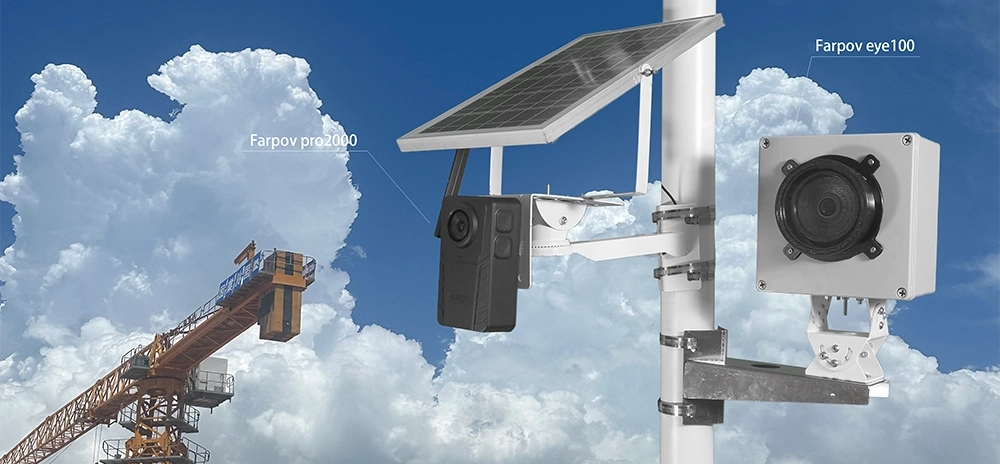
1. The "Set It and Forget It" Choice: Farpov Pro 2000
For 95% of construction sites, this is the correct choice. It balances high resolution with the practical realities of a job site (no power, no Wi-Fi).
Resolution: 4K (UHD) / 24MP Stills.
Why it wins: It uploads 4K images via 4G LTE directly to the server. You don't need to retrieve SD cards.
The "Secret Sauce": It uses a large image sensor designed for variable lighting. Unlike action cameras, it doesn't blow out the highlights when the sun is shining directly into the lens.
2. The "Hollywood" Choice: DSLR + Farpov Controller
If you are filming a landmark project (like a stadium or a museum) and the footage will be used in a TV commercial, you need more than 4K. You need 8K RAW.
The Setup: A Nikon D850 or Sony A7R IV connected to a Farpov Cam Controller.
Resolution: 8K (45MP+).
Why it wins: Unbeatable dynamic range. You can recover details from the deepest shadows and the brightest skies.
The Trade-off: It's expensive and generates massive amounts of data (100GB+ per month).
3. The "Action" Choice: GoPro HERO12 (Short Term Only)
We love GoPros, but not for long-term work. Use them for "B-Roll" – short, exciting clips of specific events.
Resolution: 5.3K.
Best Use: Mount it on a crane hook for a day, or on a worker's helmet.
Why it fails long-term: Small sensor struggles in low light. The battery won't last a weekend. The "fisheye" look is not professional for architectural documentation.

High resolution allows for digital zooming without quality loss.
4. The Hidden Challenge: Data Management
Shooting 4K time-lapse creates a data avalanche. A 6-month project can easily generate 50,000 high-resolution images.
The Farpov Advantage:
✅ Cloud Compression: We upload optimized previews for daily viewing, while storing the high-res RAW files locally or uploading them during off-peak hours.
✅ Auto-Generation: Our server automatically stitches your daily photos into a 4K video clip, so you don't need to buy a $5,000 editing computer.
Comparison Table
| Feature | Farpov Pro 2000 | DSLR + Farpov Link | Consumer Action Cam |
|---|---|---|---|
| Max Resolution | 4K / 6K | 8K+ (45MP) | 5.3K (Small Sensor) |
| Installation | Easy (All-in-one) | Complex (Custom Box) | Easy (Mounts) |
| Power Source | Solar Included | External Power Req. | Battery (1 hour) |
| Best For | Long-Term Construction | High-End Marketing | Short Events |
Conclusion
If you want 4K quality without the headache of managing batteries and SD cards, the Farpov Pro 2000 is the industry standard.
If you need absolute cinematic perfection and have the budget for a complex setup, use the Farpov Cam Controller with a high-end DSLR.







 WeChat
 WhatsAPP